
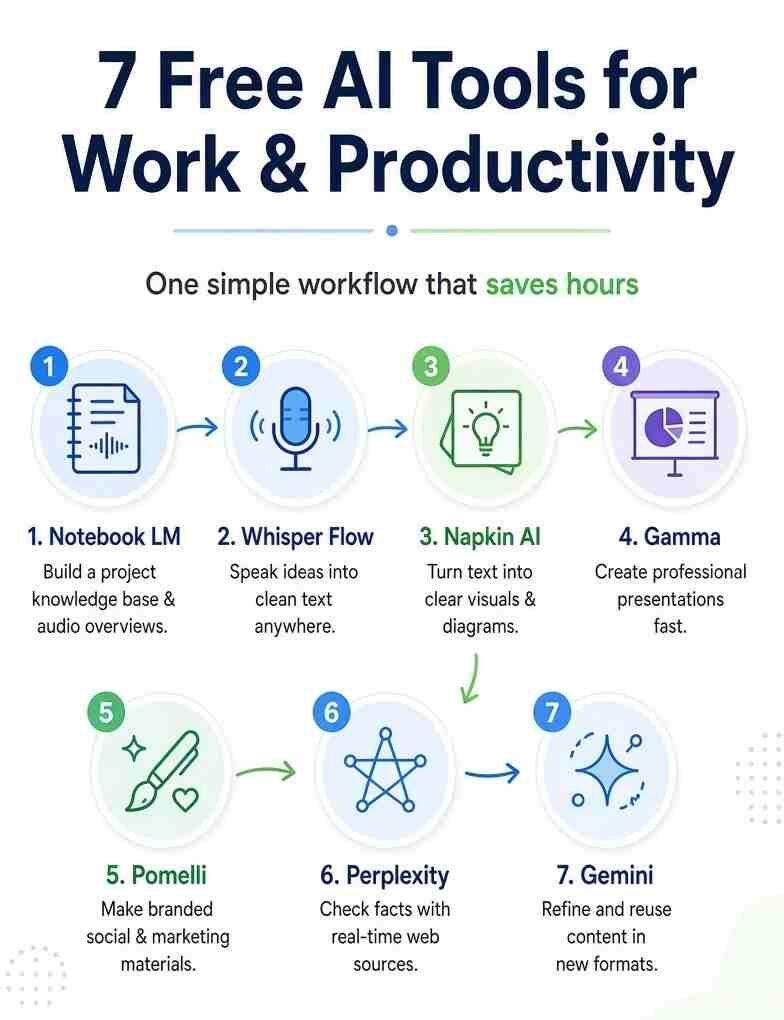
7 Best Free AI Tools: Have you ever spent hours jumping between apps only to end up with scattered notes and unfinished work? Many people face this every day. Research piles up in different places. Ideas stay stuck in your head. Turning those ideas into clear presentations or posts takes far too long. A few months ago building one solid presentation could eat up five hours or more. Now the same work can happen in about forty minutes. The change comes from linking seven free AI tools into one smooth flow.
Each tool handles one clear job. Together they form a complete system for research, idea capture, visuals, presentations, sharing materials, fact checks, and content reuse. This guide walks through each tool in the order that works best. You will see how they connect. The goal is simple. Capture thoughts fast. Organize them. Turn them into polished work. Check accuracy. Then reuse the same material in new forms. All of this stays free within normal limits.
Build a Project Knowledge Base with Notebook LM
Scattered research is the first big problem. Notes live in documents. Useful videos sit on other sites. Articles get lost in bookmarks. When you need answers you waste time searching again. Notebook LM solves this by letting you create a focused notebook for one project. Give it a clear name such as Productivity System Build. Then add sources. Upload articles about workflow tips. Include a transcript from a helpful video. Drop in your own past notes.
The tool reads everything you give it. Ask a question like what are the common bottlenecks in creative workflows. Notebook LM pulls ideas from all sources at once. It answers with citations so you can check the original spots. This feels like thinking with your notes instead of just storing them. A standout option sits in the studio panel. Choose audio overview. Instead of a basic version type clear instructions.
Ask it to focus on the three biggest time wasters in content creation. Tell it to keep the talk under ten minutes and use easy conversation. Two AI voices discuss your exact research. You can listen while walking or doing other tasks. The result matches what you uploaded and what you requested.
Notebook LM also creates study guides and interactive quizzes from the same sources. It searches your whole knowledge base. Free access comes with a Google account and generous daily limits for most users. Feed it good information and it becomes a real thinking partner.
Capture Ideas at Speaking Speed with Whisper Flow
Typing slows everything down. Speaking thoughts out loud happens about three times faster. The next tool turns voice into clean text anywhere you can type. Whisper Flow also known as Wispr Flow works on your computer and phone. After setup a small bar appears when you click into any text field.
On Mac press the function key. On Windows use control plus win. Start talking. The tool listens and types. It removes random pauses and filler words automatically. Technical names stay correct once you add them to a personal dictionary. Open a notebook chat or a blank document.
Activate the tool and speak your idea. For example say I want a workflow that captures ideas immediately organizes them visually and turns them into presentations without switching ten apps.
The whole thought appears as clean text in seconds. What takes thirty seconds to type now takes eight. Use this to feed Notebook LM directly. Talk through ideas and they land in your knowledge base ready for questions. The free level covers basic daily use with word limits that reset regularly. It works in Google Docs email and almost any app.
Turn Ideas into Clear Visuals with Napkin AI
Ideas often sound strong in your head. They can fall apart when you try to explain them. Visuals show the logic fast. Napkin AI takes text and turns it into diagrams. Create a new file. Paste the workflow idea you just spoke. Click the lightning bolt. The tool analyzes the words and builds a visual. One common result is a pyramid with three stages capture organize and present. Icons and arrows make the flow easy to see. Switch styles if needed.
Try a timeline or cycle view. Click any part to change colors or regenerate just that section. Match your brand colors. Export as a PNG when ready. Now you know the idea holds up before more work begins. You also have a ready image for later steps. The free plan gives weekly credits for generating visuals. Unlimited editing and PNG export stay available. This step prevents wasted effort on weak logic.
Create Professional Presentations Fast with Gamma
Research and visuals need a polished home. Gamma turns ideas into presentations documents or web pages without design skill. Start a new file and choose generate. Type a clear request such as create a presentation explaining a seven tool productivity workflow. Include sections for each tool how they connect and why the system works. Pick a clean theme. In about thirty seconds Gamma builds a full structure with headlines body text and spots for images.
Click into a slide about Notebook LM. Upload the PNG from Napkin AI. The tool sizes and places it. Edit text directly or ask the AI to make the language more engaging. Everything reformats automatically for phone screens or other views. Share a live link or export when finished. Gamma gives free credits that cover several complete presentations. The AI handles layout so you focus on the message. A finished deck that once took hours now appears mostly complete in minutes.
Make Branded Sharing Materials with Pomelli
A finished presentation needs simple posts or headers for teams or online sharing. Creating those by hand often takes extra time in design tools. Pomelli analyzes a website to learn color fonts logo and tone. Call this your business DNA. Enter the site address. After a short wait review and adjust if needed.
Then describe the campaign such as promote a new productivity workflow system. Focus on time saving benefits and free access. Pomelli suggests campaign ideas and creates matching assets. Open a social post. Edit the headline or body if you want. Download the finished image.
The whole process finishes in a few minutes. All pieces follow the same brand look. During its current phase Pomelli stays free with practical limits. It fills the gap between finished work and sharing it cleanly.
Check Facts and Stay Current with Perplexity
AI tools sometimes use older training data. Recent details can be missing or wrong. Before sharing anything confirm accuracy. Perplexity searches the live web. Ask whether Notebook LM Whisper Flow Napkin AI Gamma and Pomelli stay free to use or have limits. It reads multiple sources and answers with clear structure plus citation links. You can click any source to verify yourself.
Ask about common complaints with productivity tools. It summarizes top issues from current discussions. Every claim comes with proof points. Free access includes unlimited basic searches and a small daily number of deeper ones. This step protects your work from outdated claims.
Refine and Reuse Everything with Gemini
Content now exists across tools. Gemini helps refine it and turn it into new formats without starting over. Paste the text from your Gamma presentation. Ask Gemini to turn this into a LinkedIn style article. Keep the structure but make it conversational and add a strong opening.
In seconds you have a new piece. Request five short summaries one for each main tool. Or paste a section that feels unclear and ask for tighter more direct wording. The free version handles these tasks well within daily limits. It connects the earlier work into fresh outputs for different platforms. google
How the Full System Fits Together
Start with Notebook LM for research. Speak ideas into Whisper Flow and drop them into the notebook. Build visuals in Napkin AI. Load everything into Gamma for the presentation. Create sharing pieces in Pomelli. Verify details in Perplexity. Finally reshape the material with Gemini.
Each tool does one job well. They pass material forward so nothing gets retyped. Projects finish in a fraction of the old time. All stay free for regular use. Limits exist but most people never hit them on daily work. Notebook LM offers extra power beyond basic notes.
It builds study guides quizzes and deep searches across your sources. The rest of the chain supports content creation and productivity in the same easy way. This approach works for presentations team updates personal projects or learning materials. The tools stay available today. Start with one notebook and one spoken idea. Watch the rest of the system support the work. All in one place Unlick
Read more : How to Upscale Video and Image and clips to 4K with AI Free login
FAQ
Q1. What makes these seven AI tools work well together?
Answer: They form a connected workflow. Research goes into one place, voice capture helps collect ideas quickly, visuals test the logic, presentations shape the final result, branded materials improve sharing, fact-checking confirms accuracy, and refinement helps create new versions. Each step passes useful material to the next.
Q2. Are these AI tools truly free for regular use?
Answer: Yes, within normal daily or weekly limits. NotebookLM, Gamma, and Gemini work with a free Google account. Whisper Flow, Napkin AI, and Perplexity offer free tiers that cover typical needs. Pomelli is also currently available for free in its supported phase. Heavy users may reach usage limits, but everyday use is generally possible.
Q3. How long does it take to build a full presentation with this workflow?
Answer: Once the tools are set up, many people can create a full presentation in around 40 minutes. Research and idea capture take the first part, while visuals and presentation building can move quickly. Final fact-checking and sharing materials usually add only a few more minutes.
Q4. Can beginners use this AI system without design or technical skills?
Answer: Yes. Most of the tools handle layout, structure, and cleanup automatically. You mainly need to provide your ideas and clear instructions. Simple requests and short sentences can produce good results. Beginners should start with one small project to learn the workflow.
Q5. What extra value does NotebookLM provide beyond regular notes?
Answer: NotebookLM can turn your sources into audio discussions, study guides, quizzes, and mind maps. It works from the material you upload, helping keep answers grounded in your sources. Its custom audio overviews can also turn your research into focused discussions that you can listen to while doing other tasks.
2 thoughts on “7 Best Free AI Tools for Work, Content Creation, Productivity and More”